OS X の Cisco VIRL 1.0.0 で iTerm を使う
11/15 に Cisco VIRL 1.0.0 がリリースされました。
以前、OS X で Cisco VIRL のコンソール接続に iTerm を使うには というメモを記載しました。しかし、VIRL 1.0.0 では若干、UI が変更されており、外部ターミナル設定が変更されました。
AppleScript の用意
用意する AppleScript は 1.0.0 以前のバージョンと同じもので大丈夫です。下記の内容を /Users/xxxx/Software/VIRL/AppleScript/iterm.scpt に保存しておきます。
on run argv

        -- last argument should be the window title
        set windowtitle to item (the count of argv) of argv as text

        -- all but last argument go into CLI parameters
        set cliargs to ""
        repeat with arg in items 1 thru -2 of argv
                set cliargs to cliargs & " " & arg as text
        end repeat

        tell application "iTerm"
                activate
                if current terminal exists then
                        set t to current terminal
                else
                        set t to (make new terminal)
                end if

                tell t
                        launch session "Default Session"
                        tell the current session
                                write text cliargs
                                set name to windowtitle
                        end tell
                end tell
        end tell
end run
VMMaestro の設定
VIRL 1.0.0 以前は以下のように設定していました。
| 項目 | 値 |
|---|---|
| Telnet command | /usr/bin/osascript /Users/xxxx/Software/VIRL/AppleScript/iterm.scpt telnet %h %p %t |
| SSH command | /usr/bin/osascript /Users/xxxx/Software/VIRL/AppleScript/iterm.scpt ssh -Atp%p guest@%h %r |
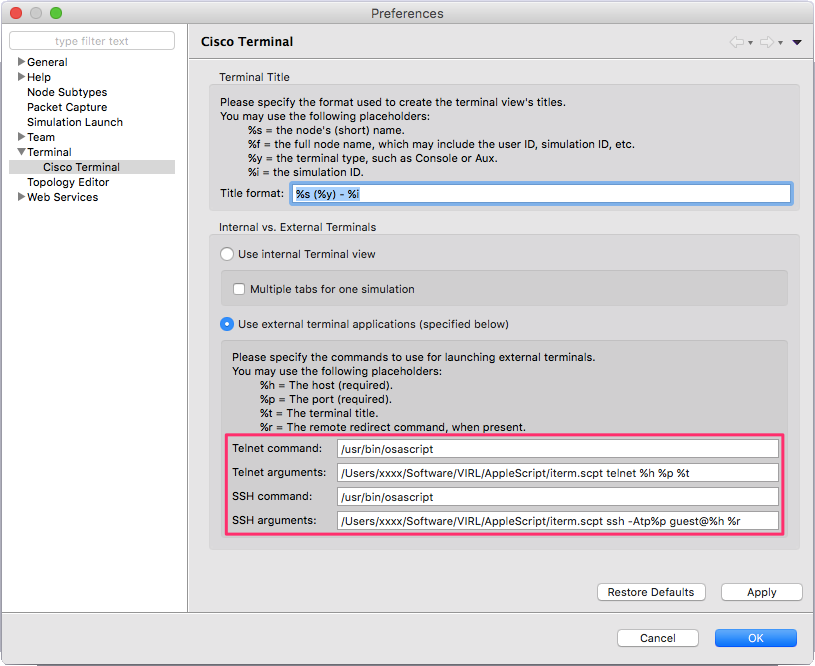
VIRL 1.0.0 の UI 変更に併せて以下のように変更します。
| 項目 | 値 |
|---|---|
| Telnet command | /usr/bin/osascript |
| Telnet arguments | /Users/xxxx/Software/VIRL/AppleScript/iterm.scpt telnet %h %p %t |
| SSH command | /usr/bin/osascript |
| SSH arguments | /Users/xxxx/Software/VIRL/AppleScript/iterm.scpt ssh -Atp%p guest@%h %r |